
Troubleshooting 12V Accessories by EAYS Electrics Golf Cart Experts
When headlights stop working or the horn suddenly goes silent, many golf cart owners assume a major electrical failure. In reality, most golf cart problems related to accessories stem from the 48V to 12V DC conversion system.
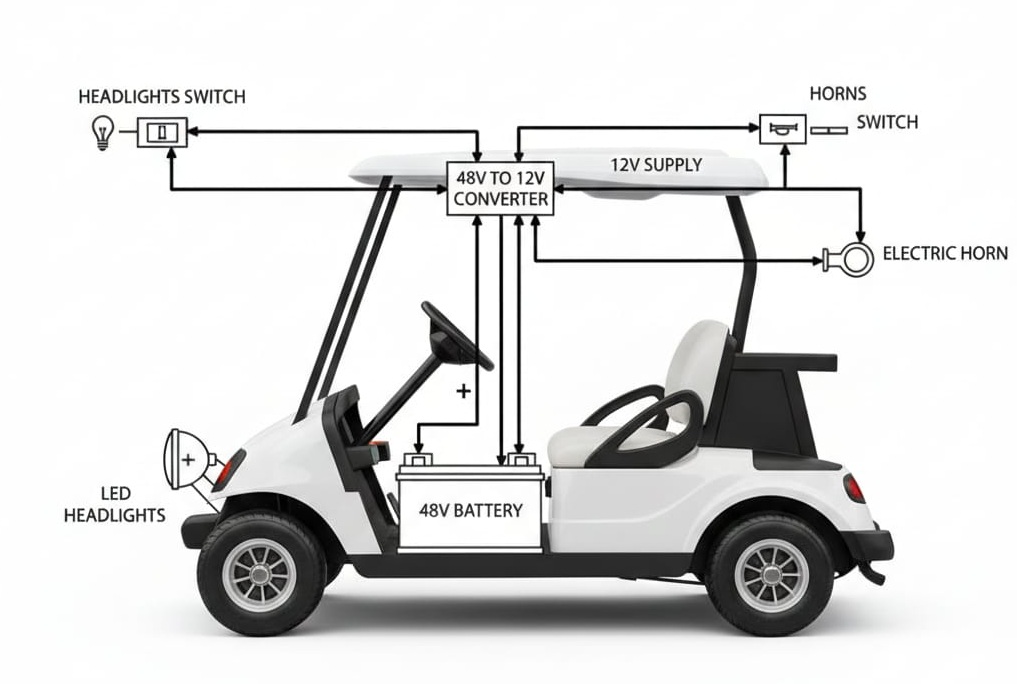
At EAYS Electrics Golf Cart, we sometimes encounter this issue in modern electric carts that run on a 48V battery pack while their accessories—lights, horn, USB chargers—operate on 12V DC. This article explains how the system works and how technicians diagnose faults efficiently.
How the 48V to 12V System Works in an EAYS Golf Cart
Understanding the electrical flow makes troubleshooting faster and safer.
Power Flow Overview
- Source: 48V power originates from the main battery pack located under the seat
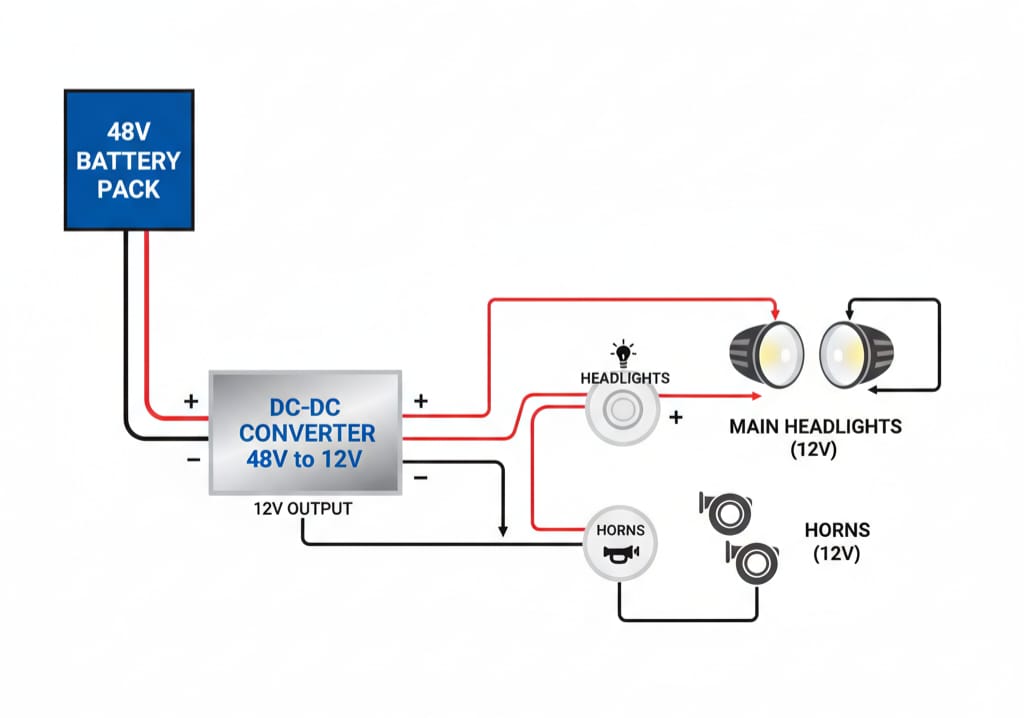
- Conversion: A DC-DC converter reduces 48V to a stable 12V supply
- Distribution: The 12V output feeds individual switches (headlights, horn, etc.)
- Load: Activating a switch completes the circuit and powers the accessory
This layout is common in EAYS golf cart and EAYS Electrics golf cart models designed for reliability and easy servicing.
Easy Access to the Electrical Control Area
Unlike many vehicles, this golf cart design allows quick access without dismantling the dashboard.
Service Access Point
- Remove the dashboard cup holder inserts
- This provides direct access to:
- DC-DC converter
- Rear side of headlight and horn switches
- Fuse block (if installed)
This design significantly reduces diagnostic time during service calls.
Step-by-Step Diagnostic Procedure
1. Check the 48V Input to the Converter
Before suspecting the converter, confirm it is receiving power.
- Measure DC voltage at the converter input
- Expected reading: 48V–52V DC
Tip:
If voltage is 0V, inspect the main 48V wiring.
2. Test the 12V Output from the DC-DC Converter
With the key switched ON (or trigger wire energized):
- Measure voltage at the converter output
- Expected reading: 12.5V–13.5V DC
Diagnosis:
- 48V present but no 12V output → converter failure or internal fuse fault
- Replace the converter with a unit of matching amperage rating
3. Verify Switch Operation and Continuity
If the converter output is healthy but accessories still fail, inspect the switches.
Headlight Switch
- Confirm 12V at the input terminal
- Toggle switch ON and verify 12V at the output terminal
Horn Button
- Check for loose or corroded terminals
- Momentary switches are sensitive to vibration and moisture ingress
4. Check Ground Connections (Critical Step)
Improper grounding is a hidden cause of many golf cart problems.
- All 12V accessories must return to the 12V negative output of the converter
- Do not ground accessories directly to the 48V battery frame
Incorrect grounding can cause:
- Flickering lights
- Weak horn sound
- Premature accessory failure
| Component | Common Symptom | Recommended Fix |
|---|---|---|
| Main 48V Fuse | Complete loss of 12V accessories | Replace fuse near battery pack |
| DC-DC Converter | Warm unit, no 12V output | Replace with correct amperage model |
| Cup Holder Wiring | Power loss on bumps | Tighten or replace loose connectors |
| Horn Unit | Clicking sound, no output | Adjust diaphragm or replace horn |
Safety Reminder from EAYS Electrics
⚠️ Even when working on the 12V side, the 48V input carries high current capable of causing arcing or injury.
- Use insulated tools only
- Remove metal jewelry
- Disconnect the main battery positive if required
- Avoid probing live terminals unnecessarily
Final Thoughts
Accessory failures don’t always mean complex electrical issues. With a structured approach and proper access points, most EAYS golf cart 12V problems can be diagnosed quickly and accurately.
If you’re facing persistent electrical issues or need professional support, EAYS Electrics Golf Cart service teams are always ready to help.
Also read : Electric Golf Cart Troubleshooting: Battery, Controller and Motor explained